INSAVLO

ON-DEVICE AI

AI that runs on your computer

Text recognition, Auto Redact, scan clean-up, document splitting and AI translation in Insavlo PDF are done by Insavlo G1 Mini and other models installed on your computer. Your documents do not need to be uploaded to the cloud and are not sent to Insavlo.

OCRPro and up

Text recognition: searchable PDFs from scans, offline

Adds a hidden text layer to scanned pages: the page looks the same, but you can search, select and copy. The recognition models come with the installer.

  • Multilingual recognition, including English, Chinese (Traditional and Simplified), Japanese and Thai
  • Sideways, upside-down and skewed pages are corrected
  • Keep reading and editing while recognition runs
  • Recognised text can be searched, copied, compared and auto-redacted

Handwriting, stamps and poor scans can be misread. On-device recognition is for reference; check the text where accurate extraction matters.
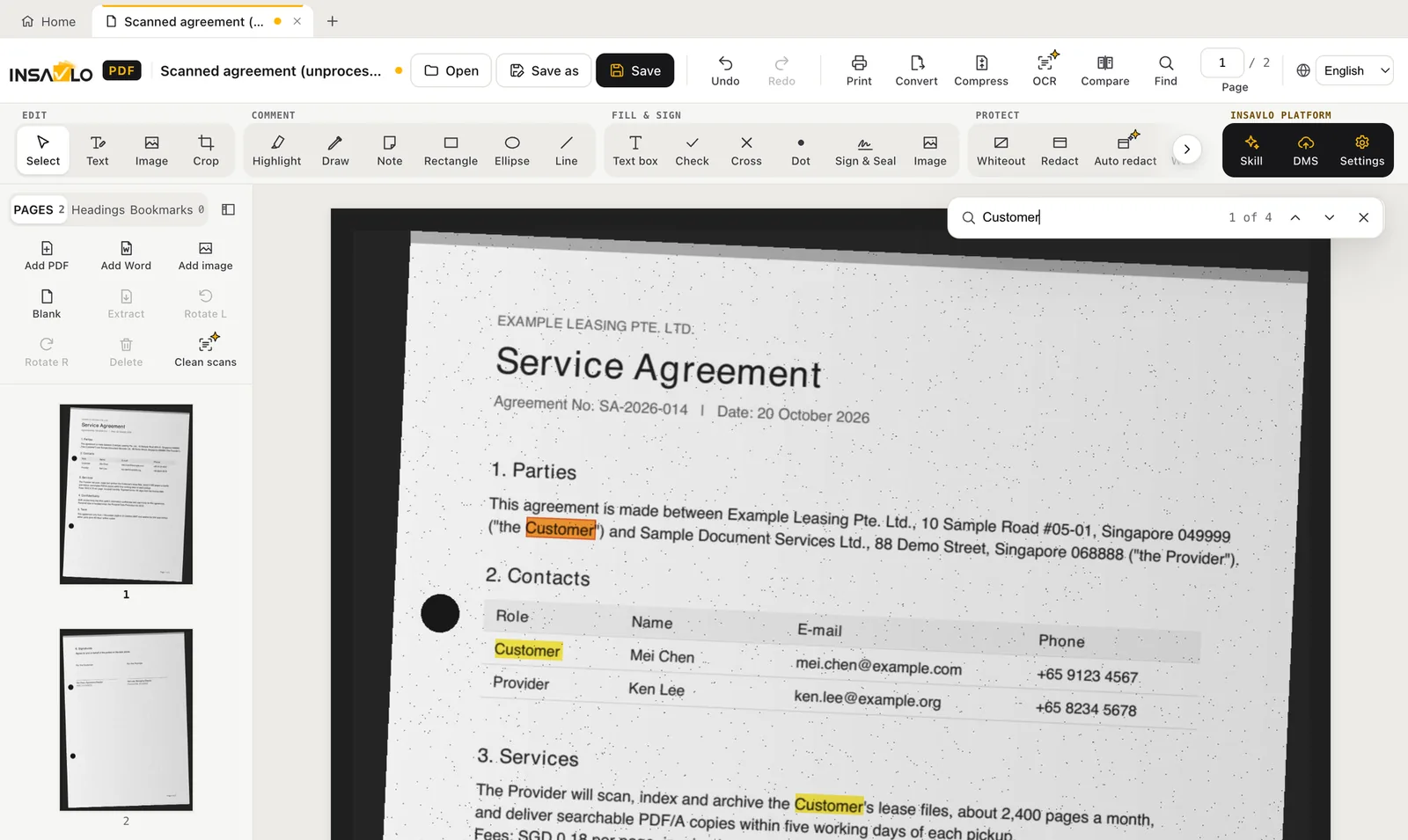
Searching a scanned contract after text recognition

AUTO REDACTPro and up

AI Auto Redact: find personal data across a document

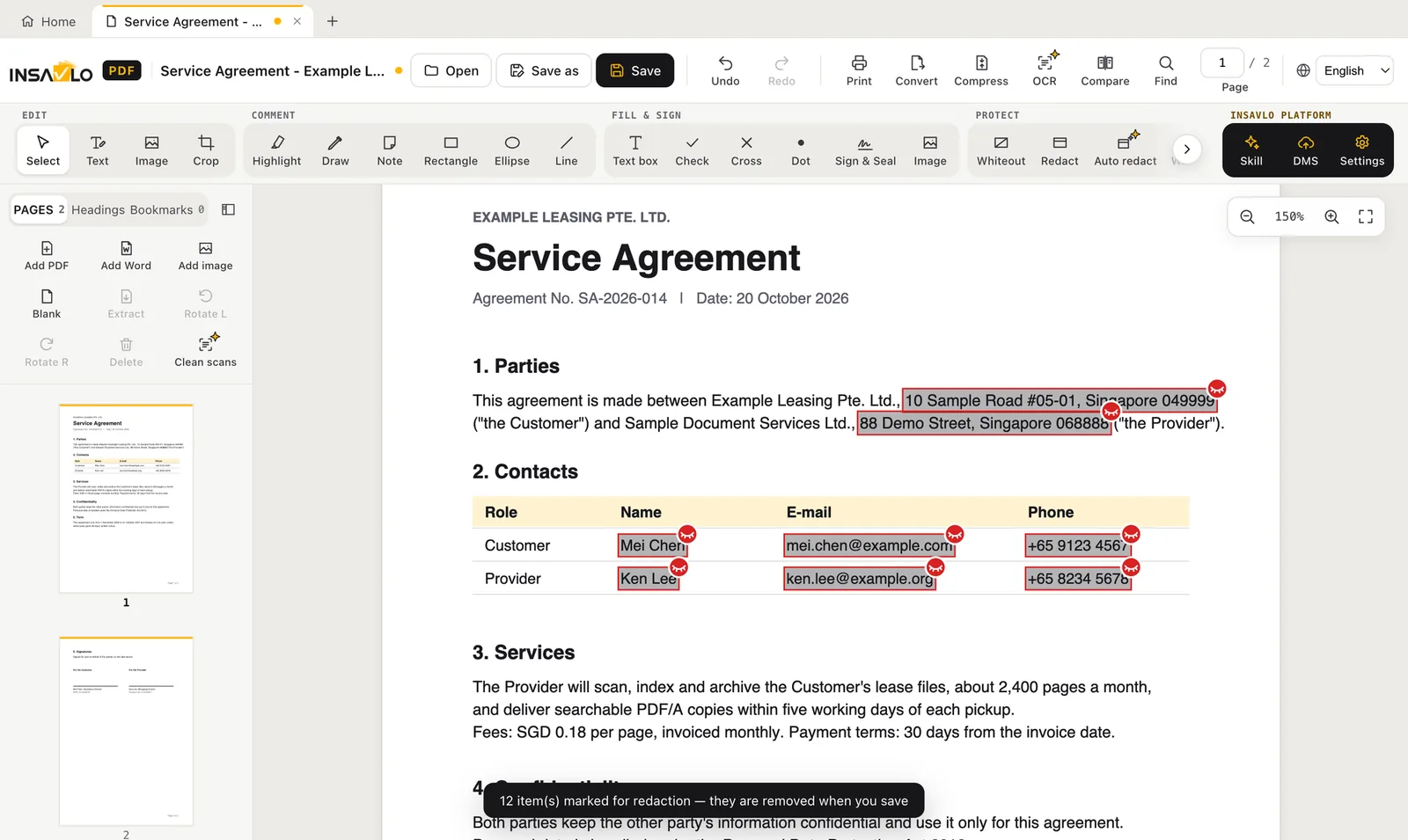
Lists names, addresses, phone numbers, email addresses, ID and passport numbers, dates of birth, bank account and card numbers by type. Review the list, untick what should stay, and mark the rest for redaction.

  • Names and addresses found by on-device AI
  • ID numbers from Singapore, Taiwan, China, Hong Kong and Malaysia
  • Card numbers, IBANs and bank account numbers, with invalid numbers left out
  • Also finds stamps and photos of people (preview) and marks each as a whole box
  • Scanned pages can be recognised first, then auto-redacted

Automatic detection can miss or over-select, so every item must be confirmed by a person. Without the AI model downloaded, names and addresses are not found. Stamp and photo detection is a preview: it can miss items or outline other content, so check each one.

Auto Redact found 12 items and marked them for redaction

AI SCAN CLEAN-UPPro and up

Automatic scan clean-up

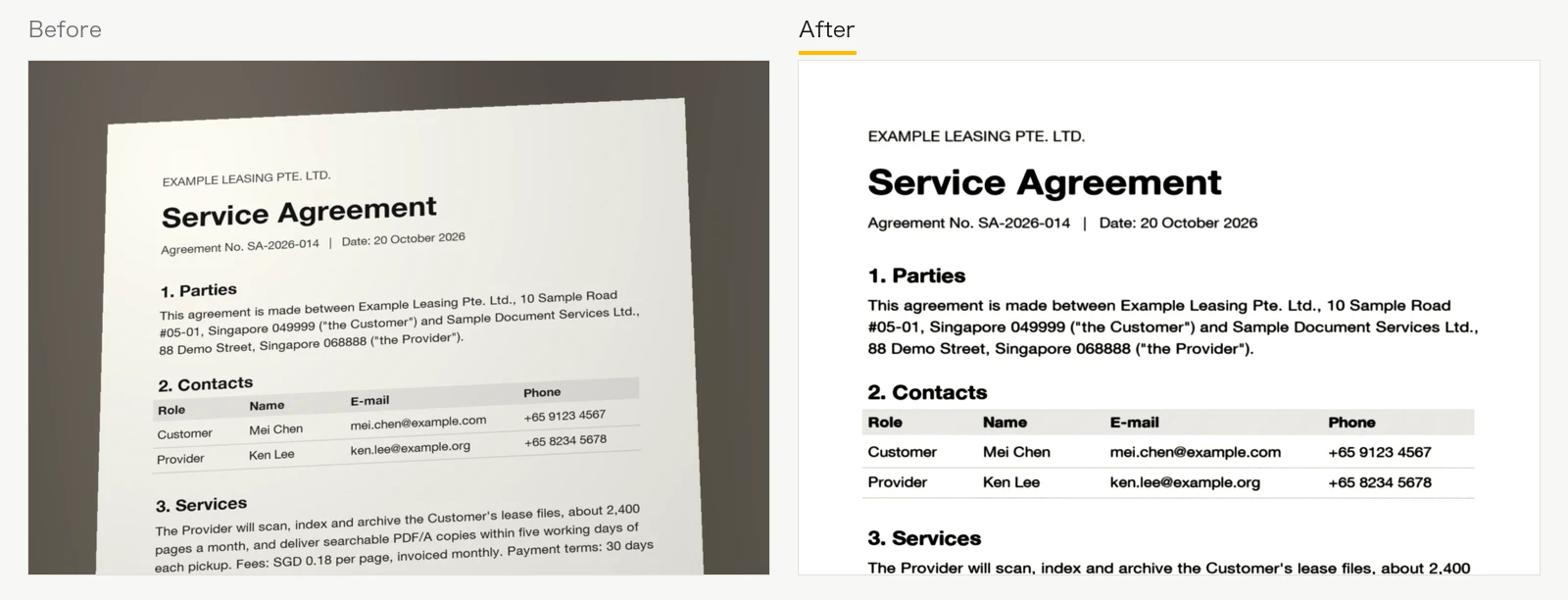
Scan clean-up automatically crops edges, removes shadows, makes the paper white and straightens skewed pages.

  • Fix orientation, straighten and crop to the paper; correct pages photographed at an angle
  • Colour, greyscale or black-and-white output
  • Can be undone

How well automatic detection works depends on image quality (lighting, contrast and background). Check the result after processing.

Before and after scan clean-up: a skewed grey scan becomes a straight white page

AI DOCUMENT SPLITTINGPro and up

Split images: several documents on a page become separate pages

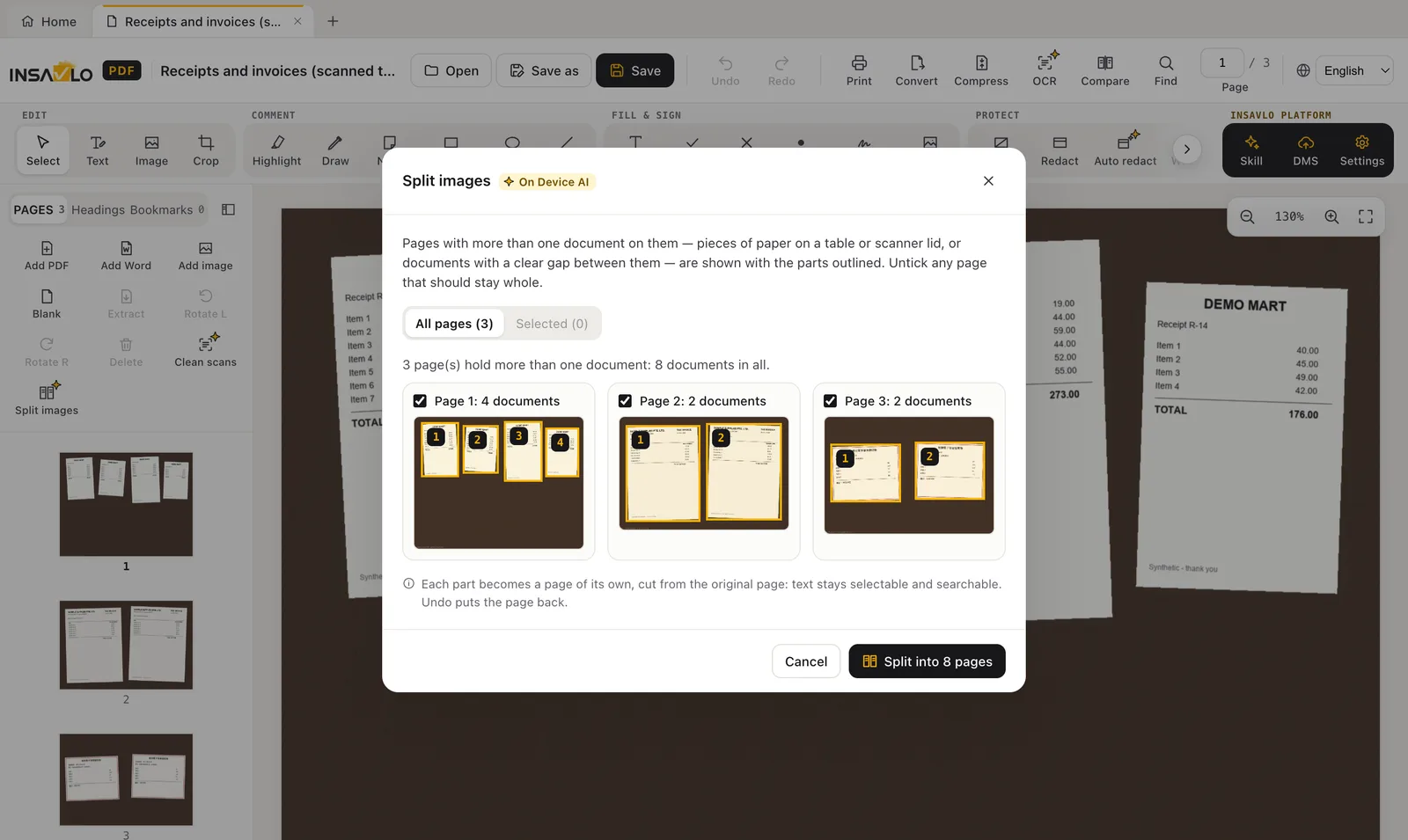
Invoices, receipts or photos scanned or photographed together are outlined automatically; after you confirm, each becomes a page of its own.

  • Finds sheets of paper on a table or scanner lid, and documents with a clear gap between them
  • Preview the outlined parts on each page, and untick any page that should stay whole
  • Split pages keep their text selectable and searchable, and can be undone

How well automatic detection works depends on image quality (lighting, contrast and background). Check the outlined parts before splitting.

Split images: 8 receipts and invoices outlined across 3 scanned pages

AI TRANSLATION · EXPERIMENTALPro and up

AI translation: a translation to review, made on your computer

Insavlo G1 Mini, the translation model, translates the text blocks of a document on your computer; the translation opens in a new tab and the original is not changed. Company names found in the document are listed in a glossary: fill in their official names to keep them consistent.

  • Translates into 22 languages, best into English, Traditional Chinese and Simplified Chinese (Traditional Chinese uses Taiwan legal and business wording); for Tagalog, Indonesian, Malay, Dutch, German, Czech and Ukrainian the app warns that the draft needs closer review
  • Numbers, email addresses, web addresses and codes are checked afterwards, and so is the language of each block; blocks that fail are flagged
  • Uses the graphics card when there is one, otherwise the processor

AI translation is experimental and off by default. Translations are for reference, may contain errors or changes of meaning, and are not a substitute for professional or certified translation; have them reviewed by someone fluent in both languages before use.

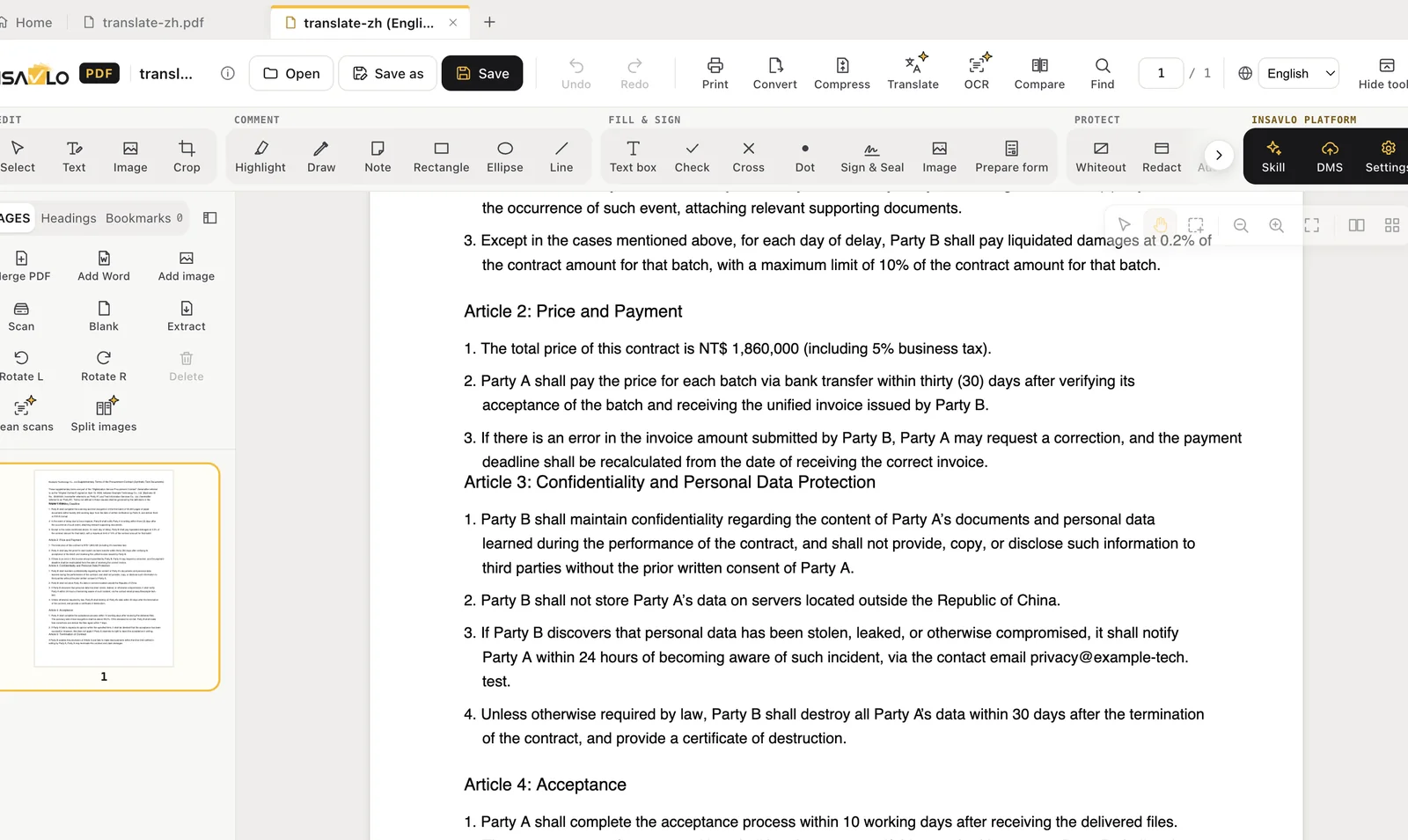
An English contract translated into Traditional Chinese on the computer, with notes beside paragraphs to review

HOW IT WORKS

Where the models come from, and where they run

  1. 01

    Install

    The text-recognition models are in the installer and work offline straight away.

  2. 02

    Download on first use

    The larger models, for Auto Redact’s personal data and the translation model Insavlo G1 Mini, are downloaded from Insavlo the first time you use them; the translation model is for Pro and Enterprise licences.

  3. 03

    Verified before use

    Every model file is checked against a fixed size and SHA-256 hash, and discarded if it doesn't match.

  4. 04

    Run locally

    Models run on your computer and need no network while working on documents.

On-device AI at a glance

FeatureEditionHow the model is installedNetwork while processing
Text recognition (OCR)Pro and upIncluded in the installerNot needed
AI Auto Redact (Insavlo G1 Mini)Pro and upPersonal-data model downloaded on first use, about 600 MB; stamp and photo detection included in the installerNot needed
AI scan clean-up (Insavlo G1 Mini)Pro and upIncluded in the installerNot needed
AI document splitting (Insavlo G1 Mini)Pro and upIncluded in the installerNot needed
AI translation (Insavlo G1 Mini, experimental)Pro and upDownloaded on first use, about 3.3 GBNot needed

OCR and Auto Redact run on ordinary computers without a dedicated graphics card; AI translation uses the graphics card when there is one. Speed depends on the processor, graphics and memory. For computers that cannot reach the internet, ask Insavlo how to install the models.

LOCAL VS. PLATFORM

On-device AI and Cloud AI are different

On-device AI (built into Insavlo PDF)

  • Runs on your computer
  • Document content is not sent to Insavlo
  • Works offline once the models are installed

Insavlo Document Cloud AI (optional)

  • Classification and extraction, validation, matching, reconciliation, three-way matching, DMS filing, translation, summaries, complex documents and handwriting
  • Runs in the Insavlo cloud (Asia or Europe) or on your organisation's own Insavlo server
  • Needs an Insavlo Platform account, agreed separately; the user confirms each time before a document is sent

HUMAN REVIEW

AI helps you work; a person still checks the result

AI recognition, detection and translation can be incomplete or wrong. Insavlo PDF marks what needs checking, but before a document is shared, filed or signed, the person responsible should check the result.

Try Insavlo PDF on your own documents

Personal will be free to download (coming soon). Try Pro free for 1 month: no payment, just fill in the form. Or contact us first with any questions.

Volume licences: contact sales →